Getting Claude Code Up and Running using AWS Bedrock Claude Opus 4.5 Model (Long Term API Keys)

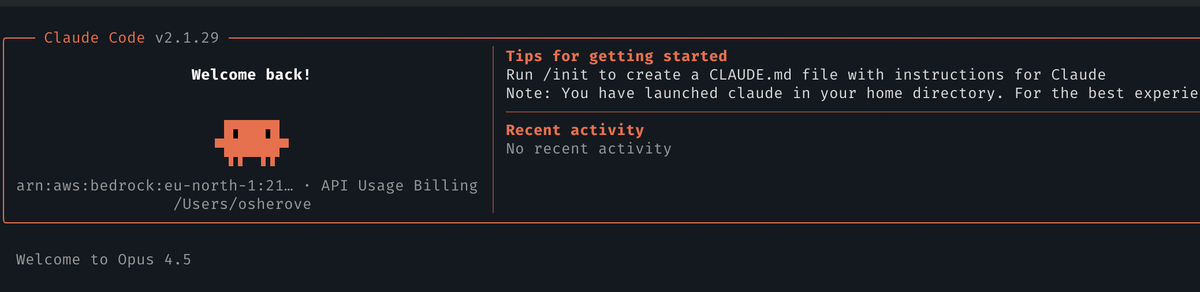
What better time is there to try out a new tool or service than when joining a new company? Well, I just recently joined AWS as a Sr. Solutions Architect. Yay! And that's my opportunity to try out a bunch of stuff that I get a chance to try so far.
One of the tools I've yet to try deeply yet is Claude Code. I usually just used Cursor up until now. But I do love the terminal, and, AWS culture is all about trying things your way so here we are. First thing I did waa try to get it workign with Bedrock (why pay for a personal license when I can use AWS bedrock resources as an employee? Also for compliance reasons I can't use an external service API for coding internally :))
OK, once you've installed claude code you will starting googling "claude code bedrock" and then you'll come across this article on Anthropic. In there you'll see multiple ways of setting up and accessing a model. The most pain free way I've found so far is :
Using Only Environment Variables, no AWS CLI, no IAM needed
- Go with Environment variables only
- No need to use aws cli
- no need to use AWS IAM
- You just need three things:
- your model's region (i.e us-east-1)
- your model's inference profile id (in ARN format)
- generate a long running API key for use with your model
Here's an example of the full list of environment variables you need to set in your terminal (or in .claude/settings.json ) for claude code to function on bedrock:
# Required for Claude to switch to bedrock
export CLAUDE_CODE_USE_BEDROCK=1
# model region
export AWS_REGION="us-east-1"
# model long running API key
export AWS_BEARER_TOKEN_BEDROCK="ABS..."
# model ARN (inference profile ID)
export ANTHROPIC_MODEL="arn:aws:bedrock:us-east-1:12345678:inference-profile/eu.anthropic.claude-opus-4-5-20251101-v1:0"
# These seem to be the magical values Bedrock needs to work well with Claude for longer responses
export CLAUDE_CODE_MAX_OUTPUT_TOKENS=64000
export MAX_THINKING_TOKENS=1024- Note that this "locks in" your claude code into a specific model. If you want to change a model later, you need to change the environment variable.
Here's what that might look like in .claude/settings.json:
{
  "env": {
    "CLAUDE_CODE_USE_BEDROCK": "1",
    "CLAUDE_CODE_DISABLE_NONESSENTIAL_TRAFFIC": "1",
    "AWS_BEARER_TOKEN_BEDROCK": "KEY-GOES-HERE"
  },
  "model": "us.anthropic.claude-opus-4-5-20251101-v1:0"
}
Steps for Configuring it All in AWS Console
AWS_REGION: Choosing a region
- Go to the "bedrock" service
- Make sure you are in the region you want (top right)
- Use this region name in AWS_REGION env var
AWS_BEARER_TOKEN_BEDROCK: Generating an API key
- Click on "Api Keys" on left hand side
- Click on "Long Term API Keys"
- Click "Generate Long Term API Key"
- Select expiration days for your key (a month? a year? up to you)
- If you want to get more access to other models, you can check the box that gives the API key access to marketplace models on AWS.
- Save the API key in your configuration env variables.
ANTHROPIC_MODEL: Getting the model's Inference Profile ARN (if not using the default)
- click on "Model Catalog" on left hand side and click on your model of choice
- Click on "open in playground" on top right
In the playground, click on three dots next to "compare mode" and click "view api request
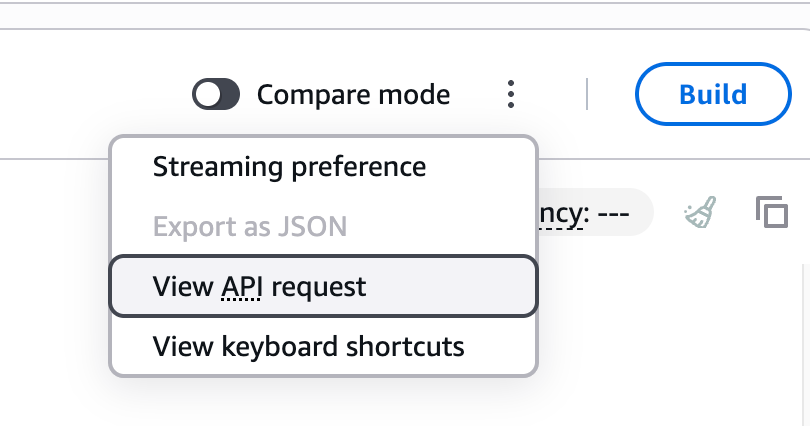
copy the ARN that occurs right after --model-id parameter and use that in your env variables under ANTHROPIC_MODEL
The rest of the environment variables stay pretty much the same:
export CLAUDE_CODE_USE_BEDROCK=1
export CLAUDE_CODE_MAX_OUTPUT_TOKENS=64000
export MAX_THINKING_TOKENS=1024
Once all these Env vars are in your session, you can start up claude code, and you'll see that it automatically uses your chosen model. no AWS cli use required.
Why?
- I don't like creating an IAM user or role when it's not really needed.
- I can provision an API key and monitor its usage later or cancel it
- I like to keep things simple for my own use. The other options had too many steps. In this way I set my .zshrc profile and export variables once and I'm done.