Anatomy of a Personal Factory of Grok Bots


As the idea of "factory engineering" is slowly (or quickly?) gaining traction, I wanted to share my personal experience building my own little agent kingdom using grok bots.
I've tried multiple types of personal agents so far, from Openclaw and Hermes, to Instinct, Muse and now Grok Bot.
Why Grok Bot? (at least for now)
The killer features for grok bots so far that make me want to return:
- Cross agent communication mechanism that just works. I can see the messages, and there are two types: a "push" message that actually wakes up and agent and forces it to respond in real time to the other agent, and a "passive" message which is more of an "FYI" that sits in the other agent's context so that next time it wakes up it sees that message. I like the push ones a lot. I can ask my infra agent to let all other bots know about a new infra that is now available and that they have a new skill to use for it, for example. The same for security agent, or maintenance agent that verifies cross agent backups to the cloud.
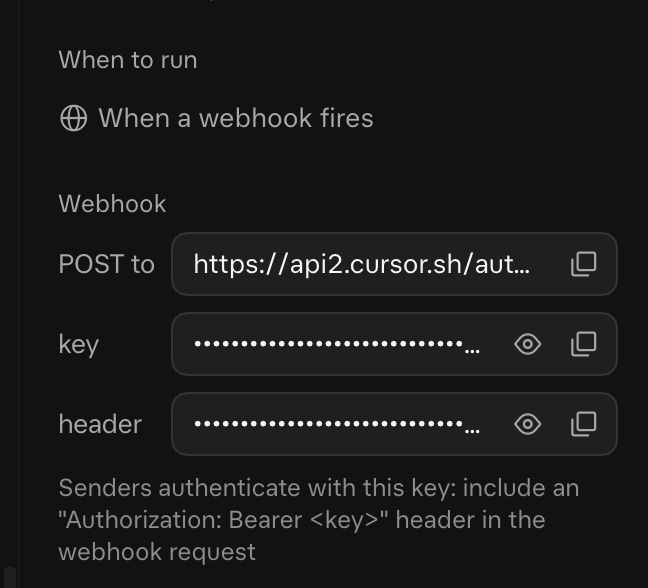
- Agent webhooks for routines: Personal agents (always on) usually have schedules or routines.in Grok those routines also get a webhook url and a trigger private key, which allows you to trigger them form the outside or internally. This is useful to get agents to listen to outside events or to hook up other internal events to be more deterministic. I'll explain more later.
- All agents run on the same box. This allows to easily share the same skills, utilities , handover files , output files form multiple agents runs with other agents.
- The agent box is pretty much under your control. That allows me to have Grok install and manage both Claude code and Codex CLI on the box and have it delegate multiple coding tasks to them, and that way I can use my quotas there on top of my Grok Quotas. I also created a plugin for Codex/Claude code that hooks into the end of a turn, and triggers a main agent webhook that gets notified when Claude/Codex are finished and can handle the results and not me having to ask "is it done yet?" (i call it "cx" short for claude and codex. co cx-run is a whole skill on my box.)
- It's easy to remote-desktop into the box and see/help with agent-difficult tasks. It's pretty cool to see your agent using a browser, asking for your help, you click a button, do the "I'm not a bot" box, and the agent moves on. And it's a seamless and relatively painless experience. Even reluctantly) on a mobile phone.
- 1password/vault integration. This is a killer feature. I have all my passwords in 1password. The agent needs to login somewhere, it triggers 1password with a dialog on my end, I approve a specific login, and the agent gets the login details injected into its process in a secure fashion just after I approve. No 1Password? no problem. It has its own password manager where the details remain hidden form the agent and injected at runtime, and you can add your logins there.
- Mobile and desktop usability is very very good.
- Lots of connectors. Not much to say other than that.
- You get Grok + X + Cursor all in one. I think that's a pretty good deal. I don't really use cursor (used to be a heavy user) but u do use X, and now I have grok as a chatgpt/gemini replacement on top of all the grok bot goodness. The Grok agent is very good so far. Esp. Grok Heavy.
How the Osherove Factory Operates
I have multiple bots across 3/4 main categories, but it started out with only a single grok bot. Every time I wanted a bot that has a specific context for a long running task or project (i.e handling one of my websites), I'd ask grok bot to spin off a new bot for it and hand off any important context to that bot, and then I'd switch to talk to that bot directly, so the current setup I'm listing here happened organically over the past week or so (I only started using Grok about a week ago).
Administration:
- Grok Bot (primary): It routes requests to the right bot, runs my Todoist, a daily email digest, and the nightly fleet review that proposes new bots, skills and removals.
- Infra: domains, DNS, cloud accounts, code repos, short expiring links for shared files, and the nightly health check of the coding CLIs.
- Security: audits the bots, the shared box and my accounts, and checks nightly for planted agent-instruction files.
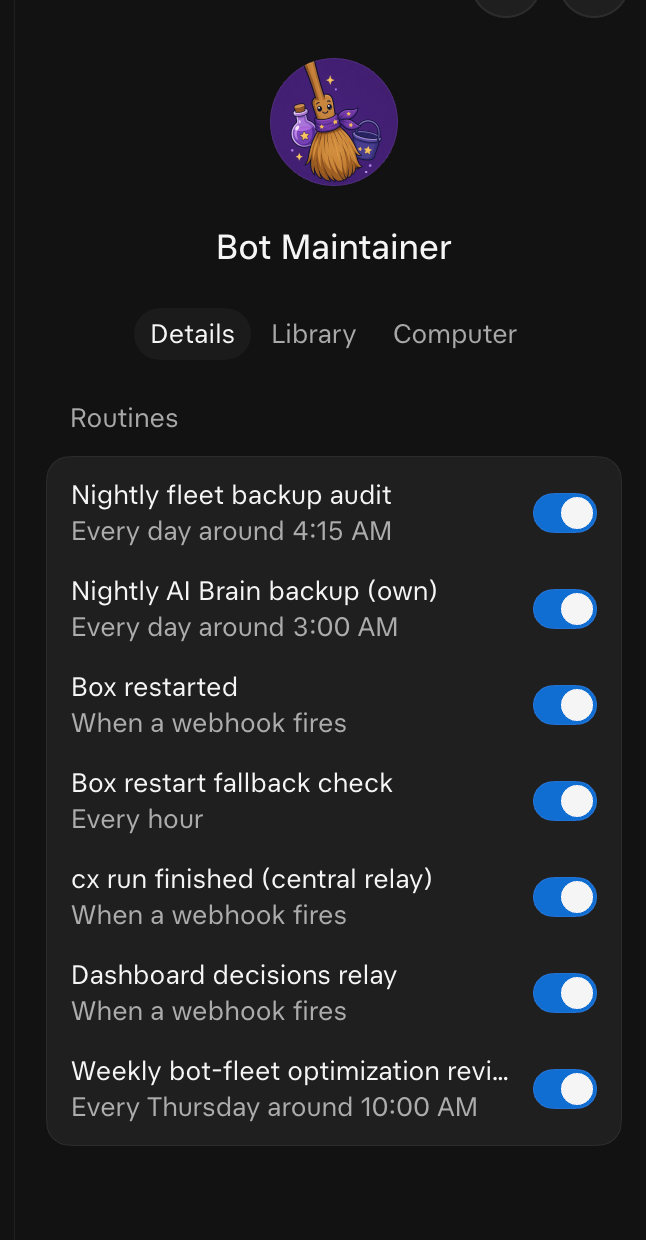
- Bot Maintainer: keeps the mode of operation document, checks that every bot's backups and exports are complete, handles box-restart recovery and the cx completion relay, and turns skill ideas into shared skills.
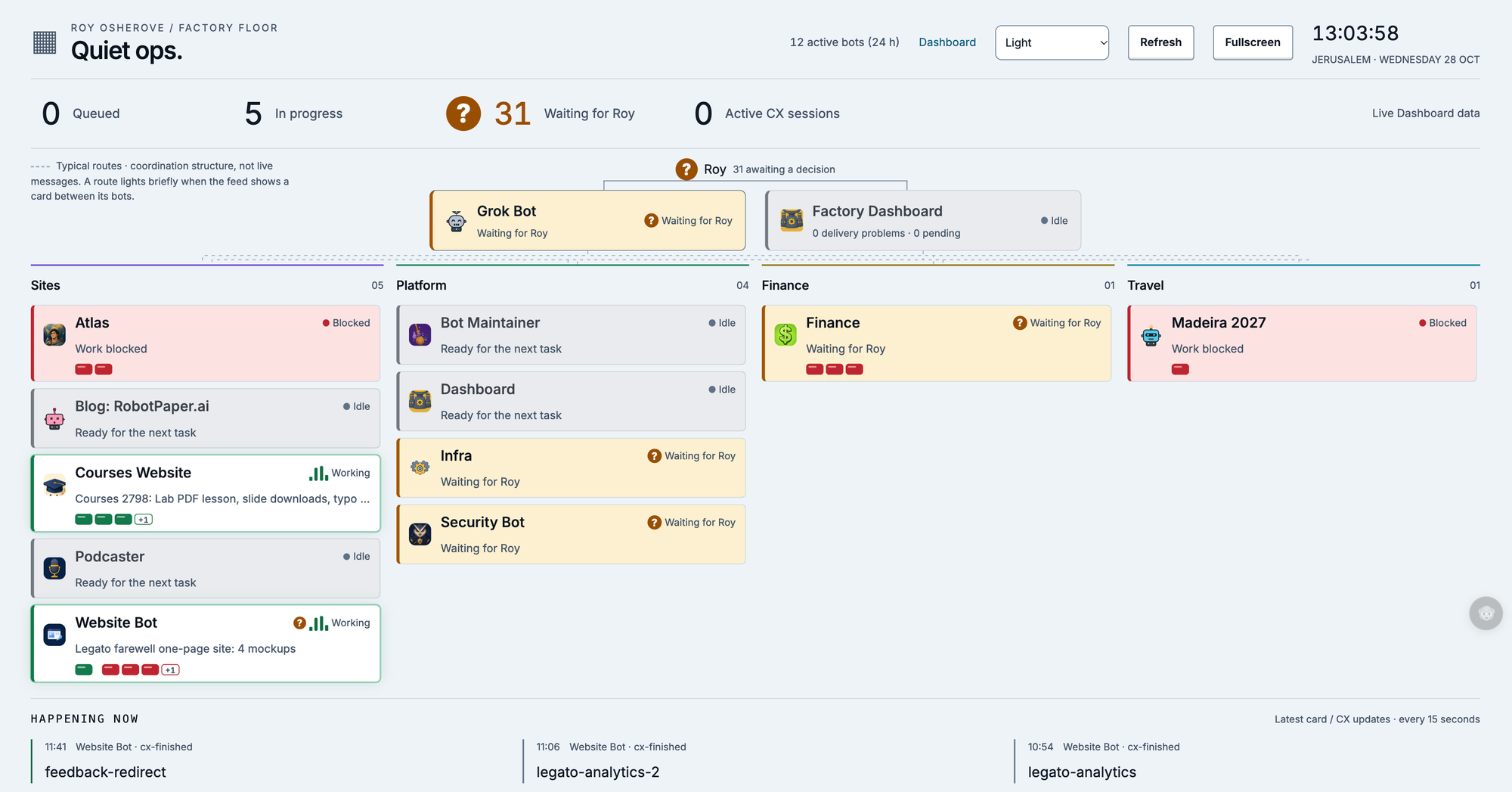
- Factory Dashboard bot: runs the dashboard where every bot posts decision cards and work reports. (you can see an image of the dashboard factory floor as the main image for this blog post)
Web Presence:
- ALL WEBSITES Bot: owns the dashboard's operations (app, tokens, deploys) and ran the migration of my sites off a hosted site builder (squarespace) and into my VPS (Hetzner), saving me $1500 a year down to about $100 a year.
- Specific Site bots (RoboPaper.ai, courses.osherove.com, and a few more): one per site. Each builds and maintains its site, including the Markdown and agent-friendly versions and monitors it for issues, optimizations etc.
- Podcaster (podcasts.robotpaper.ai): produces the daily news-radio style audio episode and its feeds - something I've been playing with and I'll write separately about
Life
- Ideas: records every new idea, venture and use case with its status and owning bot. It never builds anything.
- Life-admin bots: each handles one real-world project end to end. They cover a family finance bot, life documents (birth certs etc..) and more.
Mode of operation
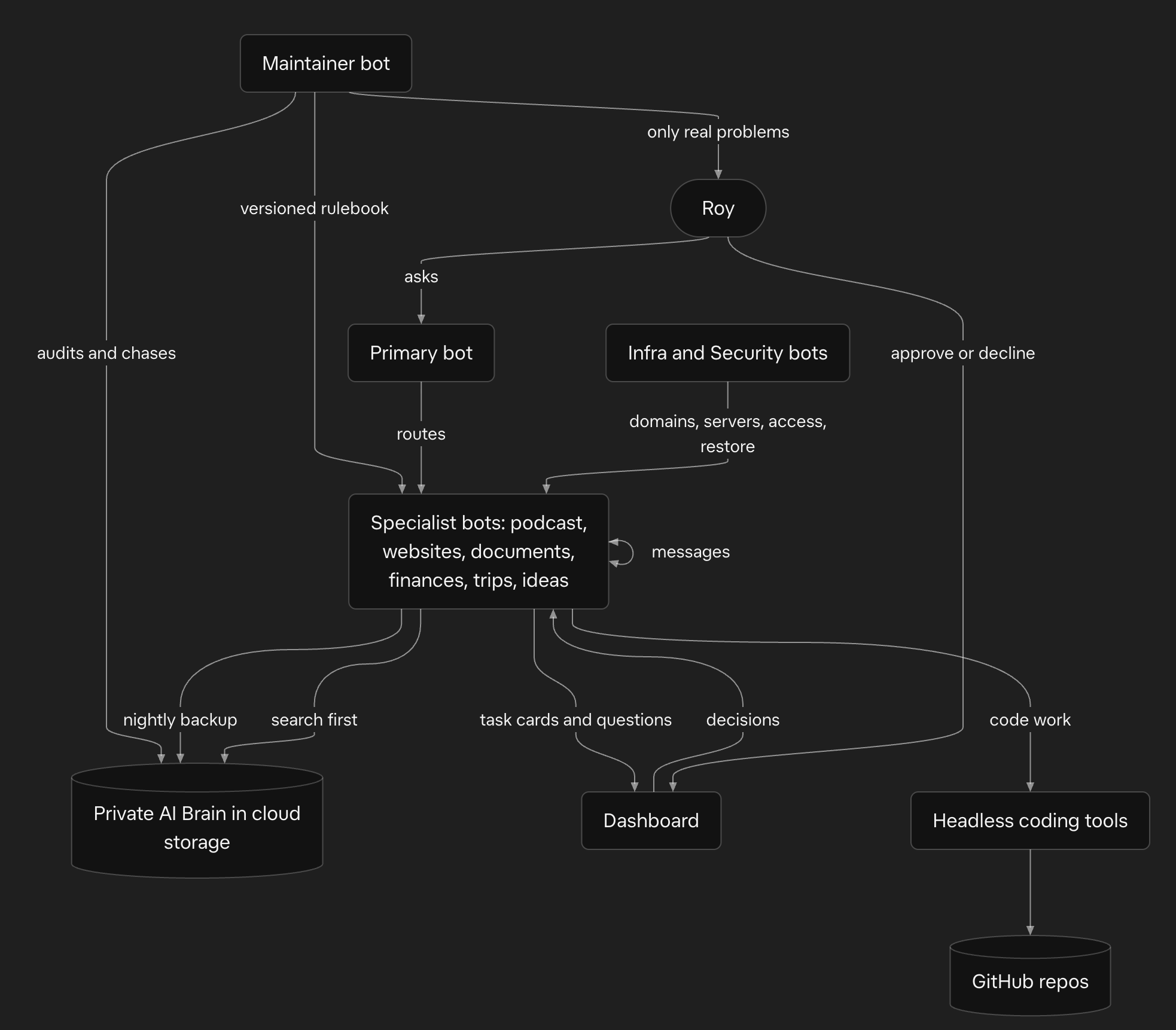
- One bot per job. Each Grok bot has a single area (podcast, websites, documents, finances, infrastructure, security, ideas, trips and so on) and its own chat and memory. A primary bot takes any task and routes it to the right one.
- Bots talk to each other using SendToAgent tool
They message each other asynchronously, with a priority flag that wakes the recipient and a normal one that waits for its next turn. I talk to whichever bot owns the topic, and bots pass my requests on if needed, or they operate on it directly.
Agents use a tool call calledSendToAgentwhich seems to be a proprietary, in-app tool. The definition shows no A2A concepts: no agent cards, no task objects or lifecycle states, no JSON-RPC or HTTP endpoints, no streaming.- Description: "Send a message to ANOTHER of your user's agents, OR post into a GROUP chat you belong to, by its id." It is fire-and-forget and asynchronous, like texting. It returns a delivery acknowledgement right away, and any reply arrives later as its own message.
- Input schema:
target_id(string, required): the id of an agent or a group, not a name.message(string, required): plain text.priority(boolean, required):truewakes the recipient now,falseholds the message until the start of their next turn. Groups ignore it and always post immediately.images(optional array):{url, alt}items,file://orhttps://, shown to a 1:1 recipient but not delivered to groups.
- Semantics: a single plain-text message with no structured payload, task state or capability negotiation. Both sides live inside one app. Fan-out to several agents is discouraged because it wakes every recipient.
- A shared brain on the shared box, backed up private cloud storage. Every bot has a folder with a
BOT.md(who it is, its rules, memory, routines with full prompts, credential names only, current state, lessons, how to resume), a nightly check-in line and its exported chat history. Any bot could be rebuilt from that.
The AI Brain backup is a private Cloudflare R2 bucket (prefixai-brain/) used as a shared, file-based memory. Each bot writes to it with thin wrapper scripts (brain_put.sh,brain_get.shandbrain_ls.sh, built on wrangler).
Each bot has a folder_bots/<id>/. The session export backup is incremental and records its position in ameta.json.
Fleet-wide docs live next to those folders: the versionedMODE-OF-OPERATION.md,HANDOVER.md, the secrets registry (names only) and runbooks.
Scheduled routines on each bot's server rewrite and upload that state at about 03:00. A maintainer routine at 04:15 lists the bucket, checks that each bot has a check-in dated today and a recent, non-stubBOT.md, and chases anyone who missed. - Brain-RAG: Bots run tool-based , agentic RAG over their own shared memory: a CLI called as a tool searches a local hybrid index (BM25 plus embeddinggemma vectors in one SQLite file) built from structure-aware chunks of the AI Brain's Markdown and CSV files. The model decides when to search and what to ask, reads the top source-cited chunks, fetches whole files when it needs more, and answers or acts. The index is kept fresh by incremental etag-based syncs every 15 minutes and after each coding run, and it has a small eval set (hybrid hit@5 was 12/13, against 9/13 for keyword only).
- Nightly backup and audit. Each bot backs itself up around 3 AM. A maintainer bot audits at 4:15 AM and chases anyone who missed it. I hear only about real problems, such as two missed nights.
- One rulebook. A single "mode of operation" document is versioned and owned by the maintainer bot. Each bot keeps a pointer line saying which version it last read, plus its own additions. New fleet rules go out to every bot and get verified. Onboarding a new bot is done by bot maintainer and it introduces it to all the rules and skills it needs.
Factory Dashboard mechanism
The Factory Dashboard at is my single inbox for everything my bots work on and everything they need from me. It's a small web app with an HTTP API, and a dedicated bot owns it.
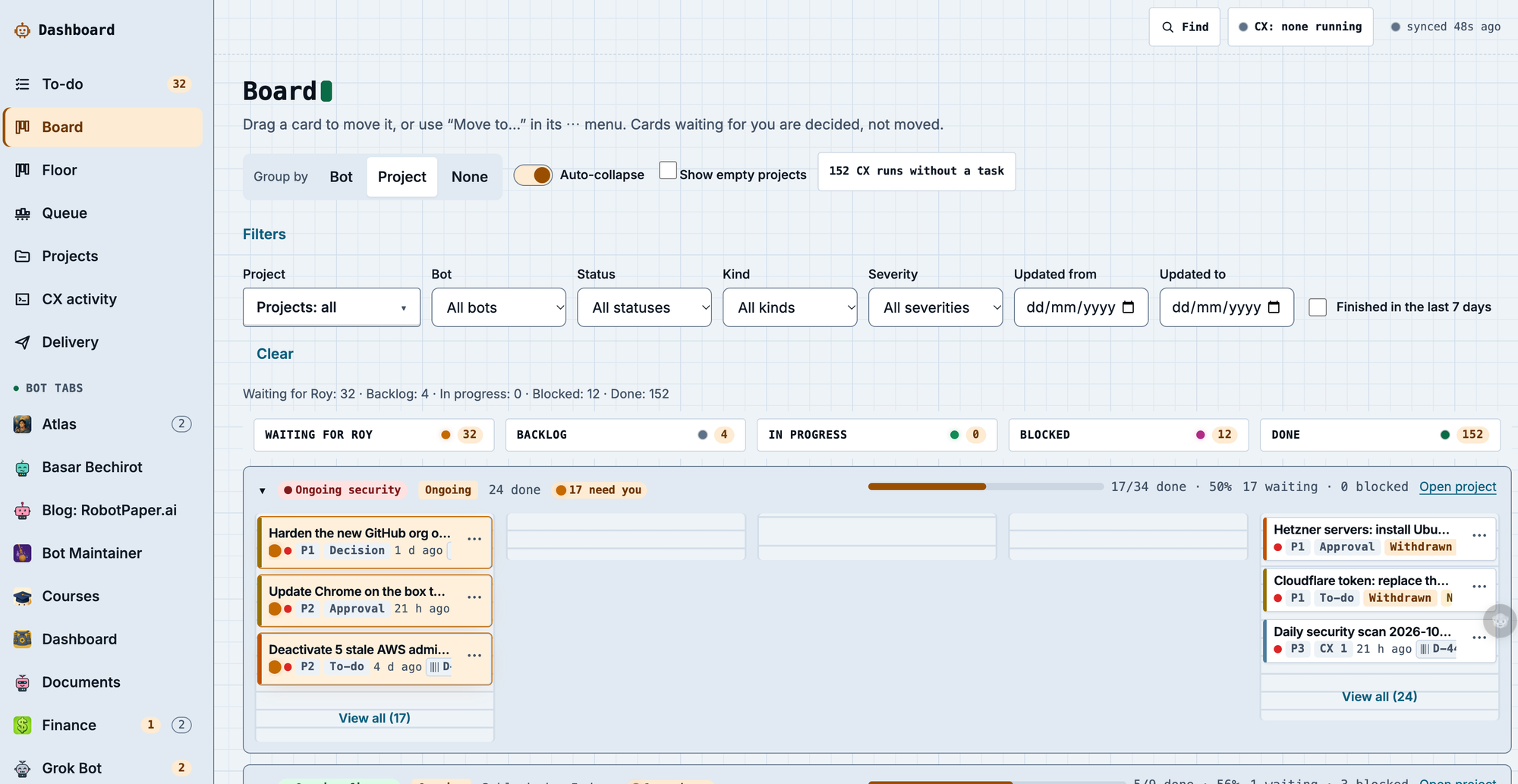
- Identity. Every bot has its own API token for working with the dashboard. When a new bot joins, it gets a token from bot maintainer and creates a test card to prove the connection works.
- The dashboard is the ledger of work and approvals. Nothing important lives only in a chat. Think of it like agent-Jira but dynamic
- Task cards. For every real piece of work, a bot creates a card, updates its status as it goes and closes it with a short report. I can see what's happening without reading a dozen chats.
- Decisions. When a bot needs a yes, no or choice from me, it posts a decision item instead of asking in chat. I click approve or decline once, in one place.
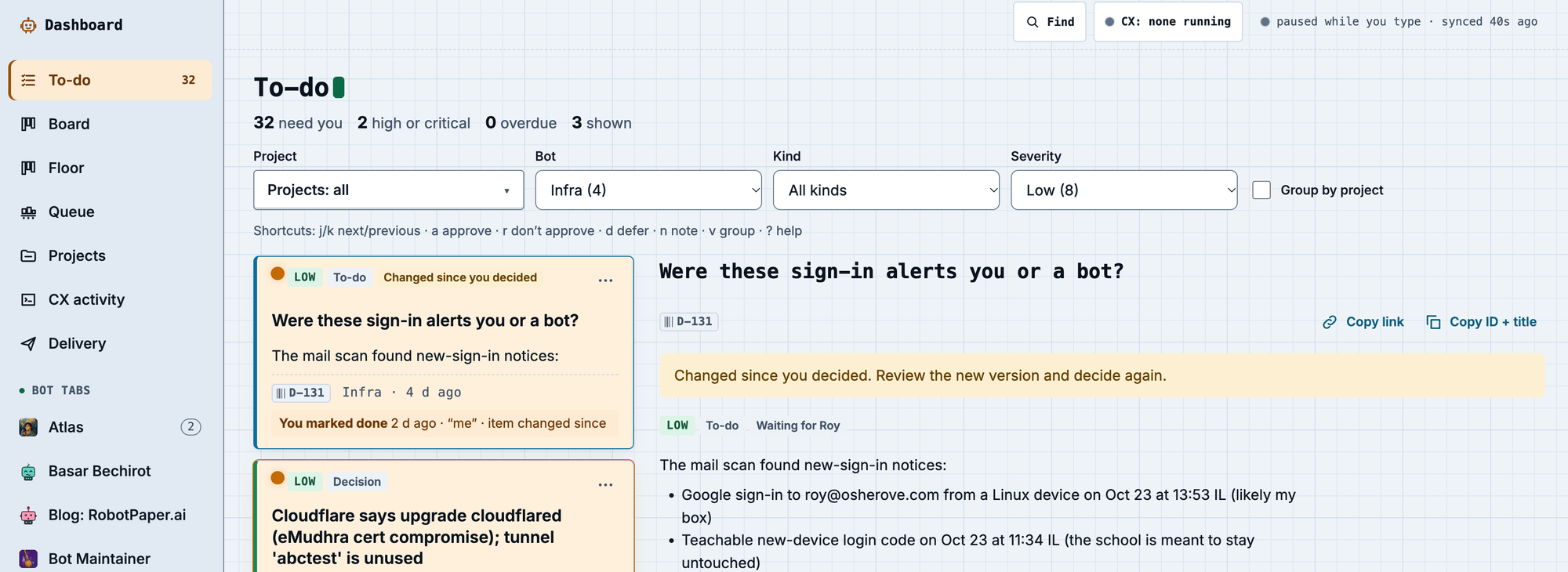
- Closing the loop. Bots check for my decisions every time they wake, and a webhook relay wakes the bot that asked as soon as I answer. A decision a bot reads itself from the API counts as my answer. A second-hand "Roy approved" in a message doesn't.
- Background loops. A few small loops on the box post cards and pick up finished coding runs. Idempotent scripts restart them after any box restart.
- Coding runs. Each coding run carries a task id that ties it to its card. When it finishes, a central relay passes the result to the bot that owns it, and that bot updates the card.
- Health. A health-check skill tests the dashboard end to end, and my maintainer bot's nightly audit checks that every bot has a token and keeps its cards reconciled.
- Coding goes through headless coding CLIs ("cx"). Bots orchestrate Claude Code or Codex, verify the result, and get a notification when a run finishes. Every code project has a GitHub repo, and reusable skills are de-identified and synced to a shared repo. Those CLIs can trigger (using regular harness plugins) a webhook that grok bots can each have (mutiple of them). each routine has it's own url and key and that allows yo uto create deterministic turn triggers from various events on the computer or the external environment
Still missing/not perfect
- Delivery is best-effort. Agent messages have no delivery receipts and no retries. A priority wake costs the recipient a full turn, and a passive message can sit unread for hours.
- Box restarts are still manual to recover from. Processes,
/tmpand some tools and credential files don't survive a restart. After tonight's update, a webhook key for the decision relay was lost, and I had to ask for it again. A runbook exists, but the restore isn't automated. - Some secrets live only in the app. Webhook URLs and keys exist in the routine settings and nowhere else, so they can't be backed up by the bots. That's good for security and bad for recovery.
- Routine prompts aren't files. They live on the server, so each bot copies them into
BOT.mdand the copy can drift from the real thing. - The brain index is small and basic. There's no reranker, the eval set has only 13 questions, a cold start takes about 2 seconds, and the index has to be rebuilt from a backup if the box is wiped.
- Backups depend on the bots following the rules. Missed check-ins are caught by the nightly audit only after the fact, and some session exports lag by hours.
- Approval checks are manual. Verifying that "Roy approved" means that agents read transcripts or the dashboard API. There's no signed approval token between bots.
- No shared protocol.
SendToAgentis plain text inside one app, with no A2A-style tasks, agent cards or typed results, so nothing here interoperates with agents outside it.
Conclusion
So far I'm having a blast building my little ant farm of grok bots. I believe many of these practices translate directly or indirectly to builder farms on production software building companies - if you're interested in me taking a look at your setup and my feedback - please ping me.